Showing posts with label animals. Show all posts

Wednesday, August 1, 2012

My Latest Work Now in SALA Festival 2012

The most recent of my creations have found their way onto the walls of a trendy clothing store called Aqua Boutique in Norwood. Co-existing with the present shop fitout, my characters sit comfortably in between an array of colourful deer-heads, and they appear to be quite at home up there:


There are lots of other venues throughout the area hosting brilliant artwork by local artists, so if you are anywhere near Norwood during the month of August you should definitely check them out. If you are not near Norwood, then I suggest you make a trip out there, it is definitely worth a visit!

This colourful collection of creative characters (created by me) will be up until the 31st of August, so don't miss out on seeing them in person while you have the opportunity!

Wednesday, March 28, 2012

Digital Sketching & Painting #1

Here are a couple of my recent digital sketches:

"Three Little Penguins"

"Gorilla Monster"

Sunday, April 17, 2011

"Cat" Corel Painter XI (Test)

Just a quick doodle done using the latest version of Corel Painter XI (trial version).


this cat is blue
and hasn't a clue
what he should do
how about you?

Thursday, April 14, 2011

"Cat" Character Design

Here are some sketches for a character I am working on. I am not sure exactly what I will use him for yet -- they are really just ideas at this stage. But I do think it would be fun to create a short animation with him. Most likely I will create something in 2D, cell or paper-cutout style... but I am also considering the possibility of doing something in 3D.

The purpose of this excercise was really to 'flesh-out' some ideas for what my cat character would like when expressing different emotions. Here is what I came up with:


(click on image to see a larger view)

I sketched these at college using a standard brush (photoshop) set to 4px and flow set to about 20%. This meant I could keep loose and sketch a whole bunch of transparent lines that built up as I went over them again and again -- a little like working with led pencil on paper.

First I sketched a rough head shape and nose that I was happy with. I then duplicated this and used it as an underlay to sketch over the top of. I started by adding eyes, eyebrows and mouths to the blank heads one by one. As I progressed I started adding accesories and playing around with the scale and position of facial features. They got kind of interesting towards the end.

I found it was a great way to flesh out some ideas without commiting to a final design or direction. Oh, and a lot of fun too!

Saturday, April 9, 2011

"Chicken" Paint.NET (Test)

Another quick test using some freeware called "Paint.NET"
Unfortunately (for my sketch style) I found the tools to be somewhat limited. The main limitations I had were with the brush tool. Everything else looks to be in order :)


Image drawn using my wacom and Paint.NET (version 3.5.8)

PROS = supports layers (plugin available for export to PSD), supports some blend modes, layer opacity, image and canvas resizing, most tools that you will find in photoshop, most importantly low cost (100% free to use).
CONS = no pressure sensitivity, some keyboard shortcuts vary to PS defaults which can get confusing, no option for soft/hard brushes, no other brush settings available (other than size), no mask layers, no pen tool, not the nicest UI but it is free after all.

At the end of the day, whether or not you get value out of a tool like this depends on what you are trying to achieve, and how you go about reaching your goal. Any piece of software is merely a tool to help you create your artistic vision. There are MANY tools/features in Paint.NET that would be attractive to people who want to edit photos and make transformations and adjustments to colours (Levels, Hue/Saturation, Brightness/Contrast etc). But as for sketching, I found this tool quite restrictive.

Sometimes limited tools can lead to interesting results. If you can learn to adapt to the tools available to you, you may be suprised by what you come up with... I was.

Friday, April 8, 2011

"Frog" PS Elements (Test)

I wanted to test out the functionality (and limitations) of PhotoShop Elements for creating coloured digital sketches, so I did this quick sketch of a frog at College the other day using PhotoShop Elements 4.0 (kinda old software now, considering the current version is 9.0) Suprisingly though, it still works ok.


I was pleasantly suprised that many of photoshop's useful painting tools are also present in elements. Including pressure and full support of blend modes. However there were a few limitations that I came across that prevent unrestricted artistic expression. Lack of support for layer masking. Absence of the pen tool. No "flow control" for brushes. Oh, and no layer groups!! Considering the price tag etc PS Elements would perform well for someone wanting to perform basic photo manipulations or do some quick sketching. It has the potential to be a very valuable tool in any artist's digital-toolbox!

Tuesday, April 5, 2011

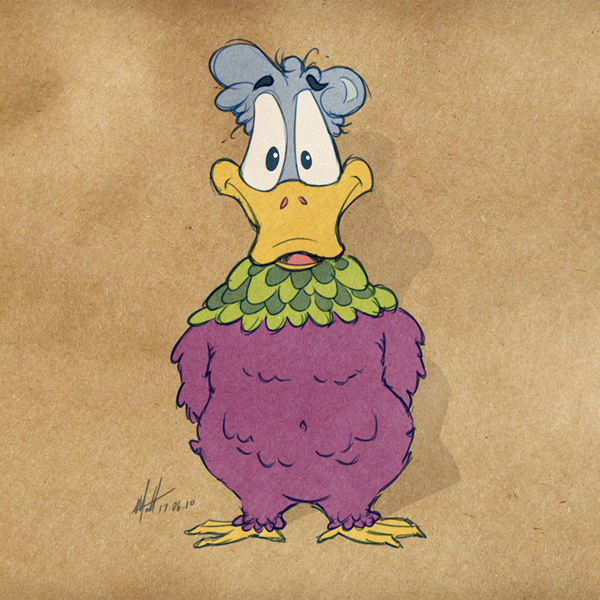
"Rooster Duck" Digital Sketch

Here's an image I drew a while ago.


Digital sketch done in photoshop (using my "Intuos 3" Wacom tablet). He started his life as duck's head in PS, and I decided to give him a Rooster's body. Don't know why, it was just a bit of fun at the time - but I am quite happy with how it turned out in the end.